OutThink allows you to customize the visual style of training content so that it matches your organization’s branding. Doing so has been proven increase end users’ engagement as they treat the training as official internal learning as opposed to generic vendor content.
Customization can be done by going to Settings –> Training –> Colors.
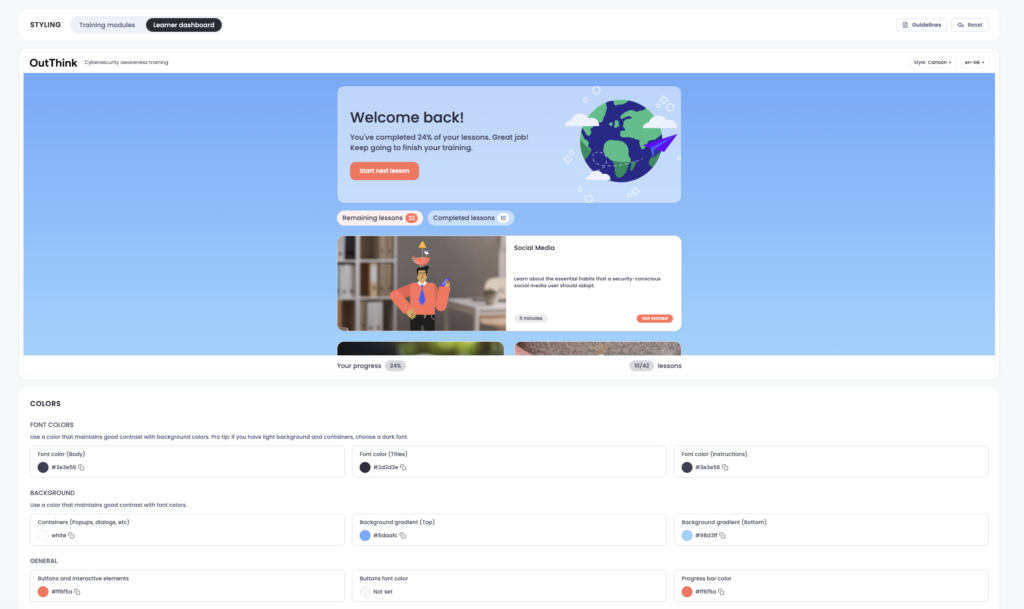
Font, background and specific action buttons can be configured for the colors needed. Admins can watch their training adapt in real-time as they apply the changes, allowing them to check colors don’t clash and are visually appealing.
It is possible to add an image to the Welcome Screen and backgrounds of assessments:

It is possible to configure both the Training modules and Learner dashboard views.

Administrators can configure the color scheme at the sub-organization level, providing the ability to customize as required for separate entities within the business.